

Core Animation Tutorial: Window Shake Effect
Core Animation is really the buzz among Cocoa developers these days and we are no different from the rest. Learning to do simple fades and frame movement is trivial, but figuring out the more complex effects is quite a challenge. We decided to venture out and try to create some really concise examples of effects you might find used in Leopard. And while these effects may not be done with Core Animation where they are found in the OS, we’ve set out to duplicate them in Core Animation regardless. Our first challenge? Shaking a login window.
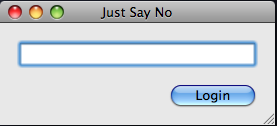
Shaking To Say No
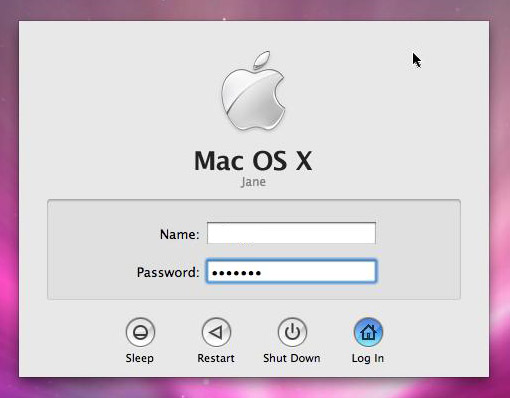
If you have your system set up to auto-login, you’ve probably never seen this effect before. Simply put, when you enter your password in the login window when doing a manual login, if you fat-finger it, it will shake you off–which is to say it will shake side to side several times in succession. It’s really quite a clever and intuitive response to what is normally responded to with a dialog.
After a fair bit of research and tweaking some code we found in a CocoaBuilder post written by Bill Dudney, author of the upcoming Core Animation for OS X: Creating Dynamic Compelling User Interfaces, we came up with a very elegant and tight solution. We have provided an example project you can download, but here is the frame animation code.
- (CAKeyframeAnimation *)shakeAnimation:(NSRect)frame
{
    CAKeyframeAnimation *shakeAnimation = [CAKeyframeAnimation animation];

    CGMutablePathRef shakePath = CGPathCreateMutable();
    CGPathMoveToPoint(shakePath, NULL, NSMinX(frame), NSMinY(frame));
    int index;
    for (index = 0; index < numberOfShakes; ++index)
    {
        CGPathAddLineToPoint(shakePath, NULL, NSMinX(frame) - frame.size.width * vigourOfShake, NSMinY(frame));
        CGPathAddLineToPoint(shakePath, NULL, NSMinX(frame) + frame.size.width * vigourOfShake, NSMinY(frame));
    }
    CGPathCloseSubpath(shakePath);
    shakeAnimation.path = shakePath;
    shakeAnimation.duration = durationOfShake;
    return shakeAnimation;
}
That's really all there is to it. We've set some static variables in the demo project that are used to determine how many times to shake the window, how vigorously to shake it and how long the shake effect should take to complete. Play with these variables yourself to see a variation of this same shaking effect you find in the OS X login window.
Thanks, this effect should prove itself useful. Here are the static variable values I thought worked best:
static int numberOfShakes = 4;
static float durationOfShake = .5f;
static float vigourOfShake = 0.05f;
[…] Cocoa Is My Girlfriend: “We decided to venture out and try to create some really concise examples of effects you might find used in Leopard. And while these effects may not be done with Core Animation where they are found in the OS, we’ve set out to duplicate them in Core Animation regardless. Our first challenge? Shaking a login window.” […]
I love this touch myself – I put something similar into a Windows app of mine that’s just doing a beta round with the client. The feedback regarding the login and change password dialogs was really positive, including ‘we love the wiggling it does when you get it wrong. It’s great that you don’t need to have an extra dialog and button to acknowledge you know you made a mistake.‘
Unfortunately, my Windows/Delphi/VCL wiggle hack isn’t as smooth (or as short) as the Mac/Cocoa/Core Animation version. :-(
[…] is short, but it has an XCode project that you can download and use. Take a look at the post, Core Animation Tutorial: Window Shake Effect and let me know what you […]
One detail bothers me. You create a dictionary entry with the CAKeyframeAnimation object returned by [self shakeAnimation:[window frame]] and the key @”frameOrigin”. That seems to imply that NSWindow has a property or ivar called frameOrigin, but nothing in the headers or documentation identifies it. How do you know what keys you can use for CAKeyframeAnimation objects?
David,
Take a look at the docs again for NSWindow and you will find the method:
– (void)setFrameOrigin:(NSPoint)point
That is the method that Matt is kicking in his example. You are right that there is no getter for it in the documentation but for this example one is not needed. In fact, this example could have piggy-backed off any number of properties on the NSWindow and achieved the same effect.
[…] Cocoa Is My Girlfriend: “We decided to venture out and try to create some really concise examples of effects you might find used in Leopard. And while these effects may not be done with Core Animation where they are found in the OS, we’ve set out to duplicate them in Core Animation regardless. Our first challenge? Shaking a login window.” Comments RSS | Trackback URL […]
[…] you see in OS X itself that present an interesting challenge to duplicate. In a previous post, we demonstrated how to shake a login window similar to the way that OS X shakes the login window when the user enters the wrong password. This […]
This works great! BUT it doesn’t work with modal windows. ;-(
[…] I found it here at Cocoa Is My Girlfriend, and I put its link on my blog before!!! The links I added on the side are really helpful […]
Programmatically how to hit a ball with another ball?
I need help to sort out the problem I’m facing in my first IPhone project. In this project I required to show several ball which animate as per the force applied by the ball who touches it. For example if there are two ball and if we hit by dragging one ball to another, it will animate from one location to another in a certain direction.
Any code snippet or small project???
Please help me as its urgent for me for my first project using IPhone SDK.
Thanks
Shafi
For some reason it does not work in my project.
Is there something I need to declare or import besides the 3 static variables and the framework? I basically copied most of the code. Does anyone have an idea why this simply doesn’t do anything?
I’m having the same problem as Max, I downloaded the demo app and all works well. But when I copied the code over to my own project, it doesn’t work… I’m stumped on what I’m missing.
@Max and @DonnaLea, so you’re able to get your own app to build, it’s just not working on the window that you’re trying to shake–is that correct? Have you connected the window outlet to the window in Interface Builder? I’m not sure what else it could be if it’s not that. You can email me directly at matt at cimgf dot com.
Thanks.
-Matt
I got the same result as Max and DonnaLea. I then changed your sample to my build settings — 10.6 and 64/32 — and it failed too.
It dose not work while running the app in 64bit mode.
Googling around i only found this here:
http://www.mail-archive.com/cocoa-dev@lists.apple.com/msg53686.html
Quote :
“Note that this code does not have any effect when compiled as 64-bit.
I don’t remember all the details at the moment, but I believe the
issue is that the ‘frameOrigin’ property doesn’t work under 64-bit. In
my own code I was forced to use the ‘frame’ property instead, which
changes the code a bit, but works for both 32- and 64-bit.”
But i could not really figure out how to make it work in 64bit mode.
Any Ideas ?
Here is my solution for fixing the 64-bit problem.
-(void)shakeWindow:(NSWindow *)window {
NSRect frame = [window frame];
CAKeyframeAnimation *animation = [CAKeyframeAnimation animationWithKeyPath:@"frame"];
NSRect rect1 = NSMakeRect(NSMinX(frame) - frame.size.width * vigourOfShake, NSMinY(frame), frame.size.width, frame.size.height);
NSRect rect2 = NSMakeRect(NSMinX(frame) + frame.size.width * vigourOfShake, NSMinY(frame), frame.size.width, frame.size.height);
NSArray *arr = [NSArray arrayWithObjects:[NSValue valueWithRect:rect1], [NSValue valueWithRect:rect2], nil];
[animation setValues:arr];
[animation setDuration:durationOfShake];
[animation setRepeatCount:numberOfShakes];
[window setAnimations:[NSDictionary dictionaryWithObject:animation forKey:@"frame"]];
[[window animator] setFrame:frame display:NO];
}
It runs well for both 32-bit and 64-bit. Thanks to the tips from dechriss.
Thanks, Pterodactyl.
Pterodactyl’s solution is great! Thanks! However when I have tied the shake effect to the user pressing a button, and if the user presses the button over and over again, the window moves to the right. How can this code be fixed to avoid this? Thanks for you help.
[…] I am adapting the code I found on http://www.cimgf.com/2008/02/27/core-animation-tutorial-window-shake-effect/. […]
[…] on setting the FrameOrigin within MonoMac. The person was trying to convert and implement the Window Shake Effect program from – JustSayNo here. The effect is pretty awesome. The effect uses Cocoa’s […]
I’m using a standard ( 32-bit/64-bit universal) architecture and the code in the tutorial did not work for me. The updated code from: Pterodactyl did work for me though! Not exactly sure why, but sure would like to know why?
Anyways, thanks Pterodactyl very much!