

iOS Crash Logs On iCloud Synced Devices
I tweeted a call for help today to figure out how to get crash logs from a device that syncs with iCloud rather than with iTunes and a cable. The issue is that you can only sync with one and not both and switching between them willy nilly can be perilous unless you enjoy losing your data just for the fun of it.
Several responses suggested taking things into my own hands by rolling my own logging mechanism when building an app I intend to ship. I think this is likely the approach I will take in the future, however, it doesn’t help my immediate problem. How do I get crash logs from an app I already shipped that is running on client’s device not physically located near me? Here’s a summary of what people suggested. Drill down in the settings app and copy the contents of the crash log like this (click/tap to enlarge):
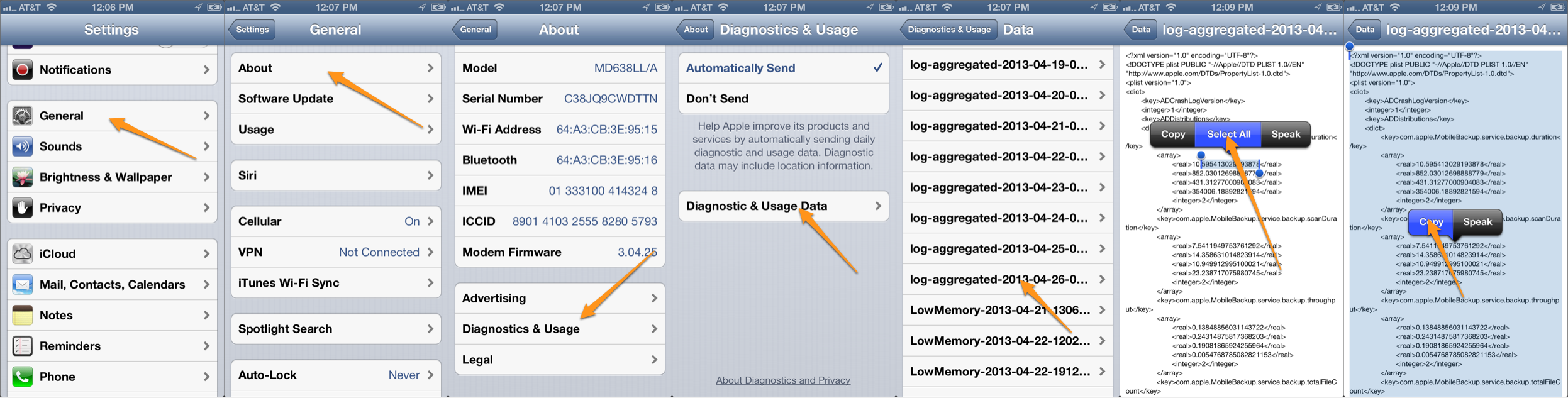
Then, paste that into an email:
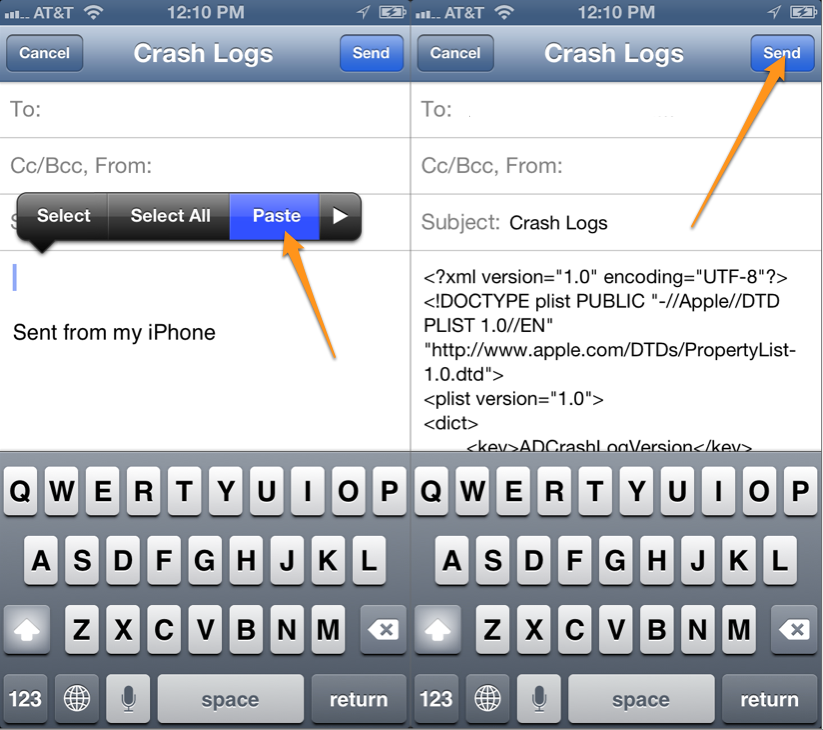
Then you can send the crash log to any email address you specify.
It certainly is not a pretty approach, but it will get the job done.
Thanks to the folks who responded to my call for help, @davidiom, @therealkerni, @thenighttrader, and @rckoenes. I appreciate it!
Anonymous Image File Upload in iOS With Imgur
It seems like a pretty useful feature, anonymous image file upload in iOS with imgur. If you need to upload images and don’t want to fool with some authentication mess like OAuth this technique is perfect. There are libraries that have simplified the OAuth process, however, it’s nice to be able to just initiate an upload, get a result URL back and be on your way. No fuss, no muss. That’s what I was looking for, so I wrote a little app that demonstrates how to do exactly that.
(more…)

Down with Magic Strings!
Developing iOS apps in Xcode is pretty great. With Objective-C and llvm we get type checking and autocompletion of all our classes and method names which is a nice improvement over my favorite dynamic languages. Unfortunately there are still some places where the compiler can’t help us. There are various resources we load from files like images, nibs & xibs and other resources which we need to specify by name, like a view controller we want to load from a storyboard.
(more…)
A Better Fullscreen Asset Viewer with QuickLook
Since last year I’ve spent a lot of time working on iPad apps for medical device companies. These companies want to be able to display their sales materials/digital assets to potential buyers on the iPad because of its gorgeous presentation. We can’t blame them. This is a great choice especially with the retina display on the third generation iPad. It’s incredibly compelling.
Our go-to solution for presenting these files until recently has been to just load everything into a UIWebView because it supports so many formats. Voila! Done! We like simple solutions to problems that would otherwise be very difficult.
This solution has worked great, but over time it’s become a noticeably dull spot in the app with some UX problems to boot. This is not good–especially for the part of the app that gets the most customer face time. It needs to shine. To go fullscreen, we just load a full size view controller modally. One issue with this approach though was that it only worked in landscape. For some reason it would get wonky (engineering parlance for, “um, I don’t know”) if we allowed both orientations since the rest of the app supported landscape only. It also had a nav bar that would never be hidden, so the user would always see it even when they were scrolling through the document content. Finally, there was no way to jump down deep into a document. If you needed to get to page 325, for example, you had to scroll all the way there. That’s just a bad user experience–incredibly tedious making it unlikely anyone would use it with a large document. These were some significant drawbacks and I didn’t have a good solution to bring the polish that this segment of the app deserved. (more…)

Unit Testing with Core Data
Whether you subscribe to Test Driven Development (TDD) or another testing practice, when it comes automated unit testing with Core Data, things can be a little tricky. But if you keep it simple, and take things step by step, you can get up and running with unit testing using Core Data fairly quickly. We’ll explore the what, how and why of unit testing with Core Data. We’ll also be using the helper library MagicalRecord. MagicalRecord not only lets us get up and running faster, but helps to cut down on the noise in our tests.

Extending NSData and (not) Overriding dealloc
A couple of weeks ago Matt Long was having a problem with an app running out of memory. He had a ginormous data file he needed to load up and process, and that memory hit was more than the app could bear. It would load just fine, into an NSData, but before he could finish with it the app would run short of memory and die.
Until recently the obvious thing would have been to tell NSData to create a memory-mapped instance. Given NSString *path pointing to a file, you could create an NSData with almost no memory hit regardless of file size by creating it as:
NSData *data = [NSData dataWithContentsOfMappedFile:path];
Starting with iOS 5 though, this method has been deprecated. Instead, what you’re supposed to do is:
NSError *error = nil;
NSData *data = [NSData dataWithContentsOfFile:path options:NSDataReadingMappedAlways error:&error];
So, fine, whatever, it’s a different call, so what? Well, it wasn’t working. Instruments was showing that the app was taking the full memory hit when the NSData was created. Mapping wasn’t working despite using NSDataReadingMappedAlways. So what could he do? The wheels of my mind started turning.
Handling incoming JSON redux
A few months ago I wrote here about a generic approach to safely take incoming JSON and save values to Core Data object. The goals of that code were twofold:
- Provide a safe, generic alternative to Cocoa’s
-setValuesForKeysWithDictionary:for use with NSManagedObject and its subclasses - Handle cases where JSON data didn’t match up with what the managed objects expected. Getting a string where you expect a numeric value, or vice versa, for example, or getting a string representation of a date when you want a real NSDate object.
The first item was the most important. It’s tempting to use -setValuesForKeysWithDictionary: to transfer JSON to a model object in one step. The method runs through the dictionary and calls -setValue:forKey: on the target object for every entry. It has a fatal flaw though, in that it doesn’t check to see if the target object actually has a key before trying to set it. Using this method when you don’t have absolute control over the dictionary contents is an invitation to unknown key exceptions and nasty app crashes.
Fixing this for managed objects was relatively easy because Core Data provides convenient Objective-C introspection methods. The general approach was:
- Get a list of the target object’s attributes
- For each attribute, see if the incoming dictionary has an entry. If so,
- Compare the incoming type to the expected type, and convert if necessary.
- Call
-setValue:forKey:with that key and its value.
And then just last week I had the thought, wouldn’t it be nice if this worked for any object, not just for managed objects?

Importing and displaying large data sets in Core Data
*Note: This is a re-print from the Mac Developer Network.*
I tend to frequent the StackOverflow website and watch for questions about Core Data. Generally if it is a question I can answer I will and if it is a question I can’t answer then I really dig in for a fun session of exploration and attempt to find the answer.
(more…)
Saving JSON to Core Data
Hi, I’m new here. You may know me as @atomicbird on Twitter. Just a few days ago my book Core Data for iOS: Developing Data-Driven Applications for the iPad, iPhone, and iPod touch (co-written with the excellent Tim Isted) was published, and Matt invited me to contribute some Core Data tips to CIMGF. I’m going to start off discussing taking JSON data from a web service and converting it to Core Data storage. Along the way I’ll cover how to inspect managed objects to find out what attributes they have and what the attribute types are.
Publishing lead times being what they are, this post covers information not included in the book.
(more…)
Super Happy Easy Fetching in Core Data
First up, I want to thank Matt Long and Marcus Zarra for allowing me to guest post on CIMGF. This post is the first in a short series of topics describing how to I’ve made using Core Data a little simpler without giving up the power features you still need. The full project from which this series is derived is available on github.
Core Data, for both iPhone and Mac, is a very powerful framework for persisting your objects out of memory, and into a more permanent storage medium. With the enormous power of Core Data, it can be easy to slip into the trap of thinking that Core Data is very complex.
Subduing CATiledLayer
Many technologies we use as Cocoa/Cocoa Touch developers stand untouched by the faint of heart because often we simply don’t understand them and employing them can seem a daunting task. One of those technologies is found in Core Animation and is referred to as the CATiledLayer. It seems like a magical sort of technology because so much of its implementation is a bit of a black box and this fact contributes to it being misunderstood. CATiledLayer simply provides a way to draw very large images without incurring a severe memory hit. This is important no matter where you’re deploying, but it especially matters on iOS devices as memory is precious and when the OS tells you to free up memory, you better be able to do so or your app will be brought down. This blog post is intended to demonstrate that CATiledLayer works as advertised and implementing it is not as hard as it may have once seemed.
(more…)
Passing around a NSManagedObjectContext on iOS
**This article is reprinted from the MDN**
The documentation on Core Data for the iPhone has lead to some confusion about how best to use Core Data on a Cocoa Touch device. One particular section seems to be the most confusing, specifically:
> A view controller typically shouldn’t retrieve the context from a global object such as the application delegate. This tends to make the application architecture rigid. Neither should a view controller typically create a context for its own use. This may mean that operations performed using the controller’s context aren’t registered with other contexts, so different view controllers will have different perspectives on the data.
> When you create a view controller, you pass it a context. You pass an existing context, or (in a situation where you want the new controller to manage a discrete set of edits) a new context that you create for it. It’s typically the responsibility of the application delegate to create a context to pass to the first view controller that’s displayed.
The idea behind this section is the issue of rigidity. Ideally, each view controller should be an island on its own. It should not rely on its parent, nor should it rely on the Application Delegate. Once a view controller is pushed onto the screen it should ideally be its own master.
## Why Rigidity is bad
It is fairly common when designing a Cocoa Touch application to “hard code” everything. Take the following navigation controller design:

When this design, it is common to code each view controller and make it “aware” of its parent. In that design, it would be common to see view controller B call methods or call back (to its delegate) view controller A. While there is nothing technically wrong with this design, it is very rigid. It is nearly impossible to either move view controller B to another location in the stack or to reuse view controller B somewhere else. This is the trap that the documentation is trying to help new developers avoid.
## Solution One
Again using a standard/normal navigation controller design, it is expected that the detail flows from left to right. The left most (or root) view controller contains the most vague information and the right most (or deepest) view controller contains the greatest detail.

In this case then the best solution is to use a `UIFetchedResultsController`. This controller can be considered a thin layer between the view controllers and the Core Data bits. The advantage is that the `UIFetchedResultsController` is designed to work with tables. The other advantage is that your least detailed view (the root most likely) can listen as the delegate of the `UIFetchedResultsController` for changes and update itself.
In this design, however, instead of passing around a context, you would hand off just the entity that the child view controller needs to know about. The Core Data Recipes example provided by Apple illustrates this design quite well.
How does this break rigidity? Each view controller, from the root on down, only knows what is passed into it. The root gets the `UIFetchedResultsController` passed into it. The child views only get the items it cares about passed into it. None of them care what their parent view controller is. There is no call back to a parent.
## Solution two
What happens when we don’t have a typical navigation controller design? Perhaps a child view can pop up a modal view that displays different information. Perhaps a child view, for whatever reason needs to access information that cannot be directly passed into it every time.
In these cases there are a few different options.
### View already has a `NSManagedObject`
Following our example above, lets say that view controller C needs to create a new object. Perhaps it is a detail view of a recipe and the user wants to add a new recipe type (perhaps she is a vegan and just discovered there is no vegan type in the list). In this case we have passed in an entity (the recipe) but not a reference to the `NSManagedObjectContext`. Fortunately this solution is easy to fix. The `NSManagedObject` retains a reference to its `NSManagedObjectContext` internally and we can access it. Therefore we can easily retrieve the `NSManagedObjectContext` from the `NSManagedObject` and create the new Type entity and pass it to the modal child or whatever our design calls for.
This again avoids rigidity because the view controller that represents the entity does not need to call up to a parent object or the `UIApplication` delegate. It is self contained and only manages view controllers that are down stream from it.
### View does not have a `NSManagedObject`
In this situation things are *slightly* more complicated. In this case we want to create a `@property` for the `NSManagedObjectContext` and require that our creator set the property.
@interface MyViewController : ViewController
{
NSManagedObjectContext *moc;
}
@property (nonatomic, retain) NSManagedObjectContext *moc;
@end
Again, the view controller is an island of its own because it does not care where that `NSManagedObjectContext` came from. All it knows is that it is required for the view to function. It does not care of it is a new `NSManagedObjectContext` specifically created for its use (perhaps for a cancelable edit tree) or if it is the same `NSManagedObjectContext` that has been passed around since the launch of the application. All it knows is that it has the elements it needs to perform its function.
By making the `NSManagedObjectContext` a settable property we can also transplant the view easily. If, at some point in the project lifecycle, we decide that it makes more sense to have the following design:

Taking from Apple’s Recipes Application, perhaps we decide that moving from the table view directly to the image of the recipe is more pleasing to the users and that when they want to see how to make it they can “flip” the image over and see the detail.
Making this change with each view controller being an island is quite simple. We just rearrange the views without having to worry too much about breaking the application.
## Solution three
Up until now we have been looking at just a navigation controller design. But what about tab bars? In the situation of a tab bar we again want to avoid rigidity because it is even more common that tabs will get moved around.
The solution to this is to again use a `@property` for the `NSManagedObjectContext` and require that the creator set this property before the view is displayed on screen. If you are creating the tabs in code this is trivial because you are already calling init on the view controller and you can add one more line of code after the init to set the property.
If the user interface is being developed mostly in Interface Builder it is slightly more tricky. Personally I am not a fan of creating navigation controllers or tab bar controllers in Interface Builder. However if that is the design then I would recommend referencing the view controllers as properties and passing along the context upon initialization of the application. It may be possible to do this entirely in Interface Builder but I am not comfortable enough to recommend that as a solution.
## Conclusion
The overall idea behind this article is to keep each view controller separate from anything up stream or in a different silo. This will make the design far more flexible in the long run. Any time that you feel the “need” to pass in a parent view controller to a child view controller, reconsider the design. Consider using a `@protocol` delegate design or NSNotification calls instead. Keep each view controller as its own private island.
View Your iPhoto Library From Your iPad [UPDATED]
Announcing PhotoGrab for iPad! I wrote this little utility app that allows you to browse your iPhoto library shares across your wifi network and download and save either a hi-res version of your photos or a version resized especially for display on iPad. It features multi-download as well as a slideshow mode. Just share your photos from within your iPhoto preferences sharing tab and you will be able to access your photos across the network from your iPad.
I wrote the app because I don’t sync my iPad with the computer where we store all of our photos, but from time to time I like to grab a photo from the iPhoto library without having to sync.
I just submitted a new point release that fixes a few crashers and other bugs to the App Store, but go ahead and take a look at this one and let me know what you think.

Free Promo Codes!
Just for the readers of this site! If you’re interested in the app, send an email to promocodes at cimgf dot com with the subject line PhotoGrab Promo Codes. I will send an email containing a promo code to the first 50 I receive (since the Apple only issues 50 of them per version). Be patient with me as I will be responding manually as I receive the messages. It will be first come, first served. Otherwise, check it out in the App Store. Promo codes are only valid in the US App Store.
Update on Promo Codes
I have received a lot of email requests for promo codes and will be sending them to the first 50 by the end of the day today (06/23/2010). If you do not receive a code by the end of the day, you were not in the first batch. When the next release hits the App Store, I will have another 50 at my disposal and will send those to the next group. Thanks for your interest.

Differentiating Tap Counts on iOS [UPDATED]
In your iPhone/iPad apps you often need to know how many times your user tapped in a view. This can be challenging because, though the user may have tapped twice, you will receive the event and it will look like they tapped once as well as twice. If the user triple-tapped, you will get the event for one tap, two taps, and three taps. It can get a little frustrating, but the trick is timing. You simply have to wait a period of time to see if another tap comes. If it does, you cancel the action spawned by the first tap. If it doesn’t you allow the action to run. There’s a few little nuances to getting it to work, but it can be done. Here is how.
(more…)